

Introduction
Image search techniques have transformed the way people discover, verify, and explore visual content online. Instead of relying only on text-based queries, users can now upload photos, search by images, or identify objects using advanced AI-powered tools. Image Search Techniques Whether you’re tracking the original source of a picture, finding similar visuals, shopping from an image, or improving your website’s visibility, mastering these techniques can save time and deliver accurate results. Modern search engines use reverse image search, visual search, Google Lens, image SEO, and artificial intelligence to analyze images with remarkable precision.
In this guide, you’ll learn the most effective image search techniques, practical tips, and best practices to search smarter and optimize your images for better online visibility.
What Is Image Search and Why Is It Important?

So, what is image search? Simply put, it’s a way to find pictures or information using an image instead of typed words. Rather than describing what you’re looking for with a string of keywords, you upload a photo, snap one with your phone, or paste in a link, and a search engine hunts through its massive image database to find matches, similar-looking results, or related information. Some tools let you combine both approaches, adding a few typed keywords alongside the image to narrow things down even further.
It sounds simple on the surface, but the technology behind it is genuinely impressive. Modern image search relies on computer vision and machine learning models that break a picture down into patterns, shapes, colors, textures, and even the relationships between objects within the frame. These systems compare that visual fingerprint against billions of other images to find the closest matches, all in a fraction of a second.
Image search matters more than most people realize, and its usefulness stretches far beyond casual curiosity. Image Search Techniques It helps you spot scams by revealing whether a profile picture or product photo has been stolen from somewhere else online. It helps verify news photos, letting you trace an image back to its original source to check if it’s being used out of context or is actually old footage repackaged as breaking news.
It helps people find better product listings by locating the exact item, or a cheaper alternative, just from a picture rather than guessing at the right search terms. And it helps protect your own creative work, since photographers, designers, and artists can use reverse image search to track down unauthorized use of their images across the web.
In the USA, more shoppers now use online image search to compare prices and check product authenticity before buying anything, especially with counterfeit goods becoming harder to spot through text descriptions alone. A quick image search can confirm whether a seller’s photos match the real product, whether a “designer” item is genuine, or whether the same product is available cheaper elsewhere.
Image Search Techniques It saves time by cutting out the guesswork of typing out awkward descriptions for things that are hard to put into words, like a specific shade of a paint color, an unusual plant, or a piece of furniture spotted in someone’s home. And ultimately, it builds trust in what you see, giving everyday users a simple way to verify images before believing or sharing them further.
How Does Image Search Work?
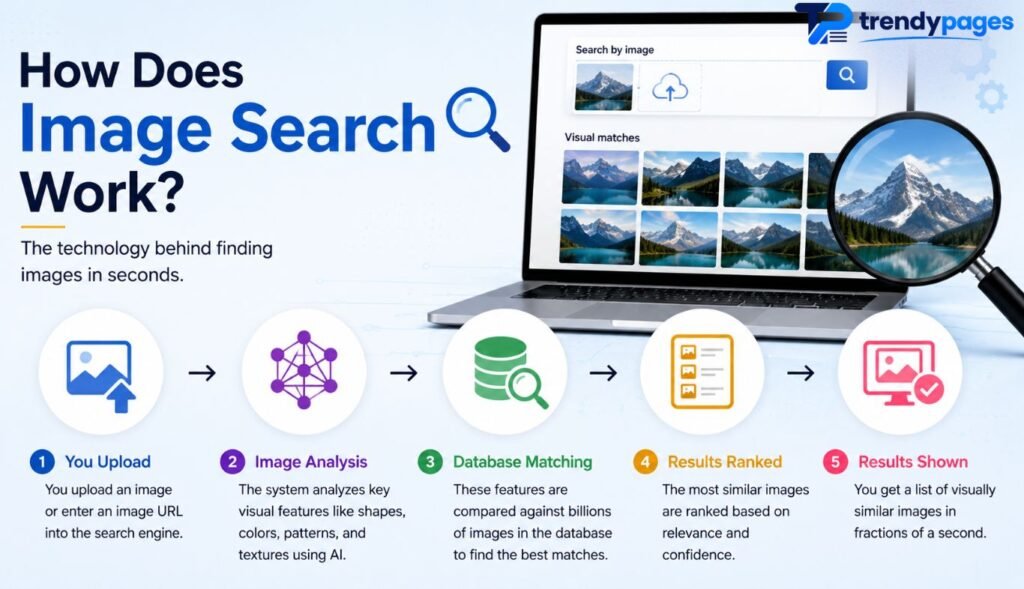
Curious about how image search works? It starts with computer vision, a branch of AI that lets machines “see” and understand pictures in a way that loosely mirrors human visual perception. Image Search Techniques Search engines break an image down into patterns, shapes, colors, edges, and textures, looking for the small visual cues that distinguish a cat from a dog, or a sneaker from a sandal. Image Search Techniques This process, called image recognition, turns pixels into data a computer can compare against millions, sometimes billions, of other images stored in its database. Every photo uploaded to the web is essentially reduced to a mathematical representation long before any human ever sees a search result.
Behind the scenes, most engines rely on convolutional neural networks and newer vision transformers to sort and label content. Convolutional neural networks scan an image in small chunks, layer by layer, gradually building up an understanding of edges, then shapes, then whole objects. Vision transformers take a slightly different approach, treating an image more like a sequence of related patches and learning how those patches relate to one another across the whole picture.
Image Search Techniques Both approaches are trained on enormous datasets so they learn to recognize everything from human faces to obscure product logos. These systems create image embeddings, which are like fingerprints for pictures, dense numerical vectors that capture the essence of an image’s visual content in a form a computer can quickly compare and rank.
When you search, the engine converts your uploaded image into its own embedding and compares that fingerprint against its image indexing system, a vast, pre-organized library of embeddings for every image it has crawled, to find close matches. Image Search Techniques The closer two embeddings are mathematically, the more visually similar the two images are considered to be, which is why reverse image search can find near-duplicates, edited versions, or even conceptually related images that share no pixels in common with the original.
This entire pipeline, recognition, embedding, and indexing, is the backbone of modern AI vision technology, and it’s the same underlying machinery that powers everything from facial recognition apps to the visual product recommendations you see while shopping online.
Different Types of Image Search Techniques
Not all image search techniques work the same way. Some rely on keywords, others rely purely on the picture itself. Knowing the difference helps you pick the right method for the job. Image Search Techniques Keyword-based search matches text tags and captions, while visual-based search, also called similarity search, compares actual image content.
Here’s a quick breakdown of common approaches and when to use them.
| Technique | How It Works | Best For |
|---|---|---|
| Keyword search | Matches text tags, alt text, and captions | Finding themed or topic-based images |
| Reverse image search | Uploads a photo to find matches online | Tracing an image’s origin |
| Object recognition | Detects specific items within a picture | Identifying products or landmarks |
| Facial recognition search | Matches faces across the web | Verifying identity, with ethical caution |
Each method plays a different role, and the smartest searchers often combine two or three of these together for accurate results.
Reverse Image Search: What It Is and How to Use It

Reverse image search flips the usual process around. Instead of typing words, you feed an image into the search engine, and it hunts for where that picture appears online. Image Search Techniques This is one of the most useful image search techniques for checking authenticity, according to reporting from HP Tech Takes, which notes that Google’s version now runs through Google Lens rather than the old “search by image” tool.
To try it yourself, right-click any image on a webpage and choose “search image with Google.” Image Search Techniques On desktop, you can also drag and drop a picture straight into Google Images. A results panel then shows matching photos, similar visuals, and the pages where the image has appeared, which is incredibly useful for image source finder tasks and catching recycled profile photos.
Step-by-Step: Performing a Reverse Image Search
- Open Google Images or the Google app.
- Click the camera icon to upload image files or paste an image URL search.
- Review the matching and similar results shown in the sidebar.
- Add extra keywords to narrow down your image lookup, if needed.
Best Image Search Tools and Platforms Compared
There’s no single “best” tool, since each platform has its own strength. Image Search Techniques Google Images, Bing Visual Search, TinEye reverse image search, and Yandex image search all approach the job differently. According to a comparison published on Indie Hackers, professionals often use more than one engine together, since Google tends to shine at identifying objects while Bing is stronger at tracing an image’s original source.
Yandex Images deserves a special mention here too. Image Search Techniques Investigators and researchers rely on it heavily for facial matching, since its index covers regions that Google and Bing sometimes miss. Meanwhile, Pinterest Lens focuses on style and shopping discovery rather than pure source tracing, making it a favorite for fashion and home decor searches.
| Tool | Strength | Weakness |
|---|---|---|
| Google Images / Google Lens | Object and product identification | Struggles with some AI-generated fakes |
| Bing Visual Search | Finding original image source | Smaller index for niche objects |
| TinEye | Exact duplicate image finder matching | Limited object recognition |
| Yandex Images | Strong facial and regional matching | Less familiar to US users |
| Pinterest Lens | Style, fashion, and decor discovery | Not built for source verification |
How to Search Images by Keyword, Object, or Person
When you want a picture search based on words, be as specific as possible. Image Search Techniques Instead of typing “dog,” try “golden retriever puppy sitting in grass.” Precise keywords lead to cleaner, more relevant results, and they cut down on wasted scrolling through unrelated photos.
Object recognition works differently. You upload a photo, then crop or circle a specific item within it, like a pair of shoes in a group photo. This isolates exactly what you’re searching for. Image Search Techniques Searching by person is trickier, and it carries real privacy responsibility, so always use facial recognition search tools thoughtfully and only for legitimate, respectful purposes.
How to Find the Original Source of an Image
Trying to find image source details? Reverse search is your starting point, but tracing the very first appearance takes a bit more digging. Search engines let you filter results by date, Image Search Techniques which helps you spot the earliest instance of a photo online, rather than a copy posted somewhere else later.
EXIF data can also reveal helpful clues, since many photos store hidden image metadata like the camera model, date taken, and sometimes even GPS coordinates. Image Search Techniques Free EXIF viewer tools let you check this information instantly. Combining metadata checks with similar images cross-referencing gives you a much clearer picture of where a photo truly began its journey online.
Advanced Image Search Tips and Tricks for Better Results
Want sharper, more accurate results? Google search operators can seriously boost your image search accuracy. Typing site: narrows results to one website, filetype: Image Search Techniques filters by file format, and imagesize: targets a specific resolution. These small tweaks turn a vague search into a precise one.
Don’t stop at a single engine, either. Cross-checking a result across Google, Bing, and TinEye confirms whether a match is genuine or coincidental. Image Search Techniques This layered approach is especially useful for copyright image search work, where a single wrong match could cause real problems for a business or creator.
How to Perform Reverse Image Search on Mobile Devices
Most people now search from their phones, so image search on mobile matters more than ever. On iPhone, open Safari or Chrome, tap and hold any picture, then choose “Search Image.” You can also use the Google app’s camera icon for a full camera search experience straight from your photo library.
Android users have it even easier, thanks to Google Lens being built directly into many devices. Long-press an image in Chrome, or open the Google app and tap the camera icon to snap a search using photo query on the spot. Circle-to-search style features, now common on newer Android phones, let you highlight anything on your screen for an instant visual lookup.
Image SEO Best Practices to Rank Higher in Google Images
If you run a website, image SEO should be part of your strategy. Start with descriptive file names instead of generic ones like “IMG1234.jpg.” Add clear alt text describing the picture, since this helps both accessibility tools and Google Images ranking algorithms understand your content.
Compressing images speeds up your page load time, which search engines reward. Submitting an image sitemap and using structured data also improves how your pictures appear in results. These steps to optimize images for Google aren’t optional anymore, especially as visual-first browsing keeps growing across the USA.
Common Image Search Mistakes to Avoid
Even experienced searchers make image search mistakes that hurt their results. Uploading a blurry or heavily cropped photo often confuses image matching algorithms, leading to irrelevant matches. Skipping search filters is another common misstep, since filters help narrow down huge result sets into something usable.
Privacy and ethics deserve attention too. Running a facial recognition search on someone without consent crosses an ethical line, and it can carry legal risk depending on your state. Always respect copyright when reusing images you find, and credit original creators whenever their work appears in your content.
Real-World Uses of Image Search Techniques
Image search for shopping is one of the most popular everyday uses. Spot a lamp in a hotel lobby, snap a photo, and instantly find where to buy it. Travelers use similar tools to identify landmarks, plants, and even unfamiliar foods while exploring new places.
Professionals rely on these tools too. Journalists use reverse image search techniques to verify breaking news photos before publishing them. Marketers track copyright image lookup cases to catch unauthorized use of branded visuals. Even law enforcement and fact-checking organizations use visual search to confirm whether an image matches the event it claims to show.
The Future of AI-Powered Image Search
AI-powered image search keeps evolving fast. Multimodal AI models, the kind that understand text, voice, and images together, are already blending into everyday search bars. Instead of choosing between typing or uploading, you’ll increasingly do both at once, asking a question about a picture in plain language.
Expect semantic image search to keep improving too, meaning engines will understand the meaning behind an image rather than just matching pixels. This shift toward AI visual discovery will make searches feel more like a conversation and less like a guessing game, changing how Americans shop, research, and verify information online.
Final Thoughts
Image search has come a long way from a simple novelty feature. Today’s image search techniques combine AI image search, visual recognition, and smart filtering to help you find almost anything online, starting from just a picture. Whether you’re shopping, fact-checking, or protecting your own work, these tools genuinely make life easier.
Try one of the methods above next time you spot a mystery photo. Start with Google Lens, cross-check with Bing or TinEye, and see how quickly the answer appears. Once you get comfortable, search images online will feel just as natural as typing a question into a search bar.
FAQs
1. What are image search techniques?
Image search techniques are methods used to find information, similar images, or the original source of an image using visual content instead of text.
2. What is reverse image search?
Reverse image search lets you upload an image or paste its URL to discover where it appears online and identify its original source.
3. Which is the best image search tool?
Google Images and Google Lens are the most popular, while TinEye, Bing Visual Search, and Yandex Images offer excellent alternatives for specific search needs.
4. Can I search using a screenshot?
Yes. You can upload a screenshot to Google Lens, Google Images, or Bing Visual Search to identify objects, products, or similar images.
5. How can I find the original source of an image?
Use reverse image search tools like TinEye or Google Images to trace an image back to its earliest known online source.
6. Does reverse image search work on mobile devices?
Yes. Apps like Google Lens and Bing Visual Search allow you to search images directly from your smartphone using photos or your camera.
7. How does AI improve image search?
AI analyzes visual features such as shapes, colors, and objects to deliver more accurate and relevant image search results.
8. What is the difference between image search and visual search?
Image search finds information using an existing image, while visual search identifies objects or text within a photo using AI.
9. Can image search help with SEO?
Yes. Optimizing image file names, alt text, and metadata can improve visibility in Google Images and drive more organic traffic.
10. Is reverse image search free?
Most reverse image search tools, including Google Images, Google Lens, Bing Visual Search, and TinEye, offer free basic search features.